Custom integrations
A voice AI that can hold a conversation is table stakes now — most tools on the market can do that part. The real difference between them shows up the moment the call ends: what happens to the information the caller just gave you? That's what a custom voice AI integration is for, and it's the difference between a bot that answers your phone and one that actually does the job of a receptionist.
Most off-the-shelf and no-code voice bots follow the same pattern: the bot answers, holds a conversation, and at the end produces a transcript or a summary — usually emailed to you or dropped in a dashboard. That's genuinely useful for never missing a call, but it stops short of finishing the job:
The conversation is automated. The outcome isn't.
A custom voice AI integration connects the agent directly to the systems that outcome belongs in — your scheduling tool, your CRM, your ordering system, your automation platform — so the result of the call is written back automatically, not queued up for a human to enter later. In practice, that usually means the agent can:
This is exactly what we cover in more depth in AI voice agents for custom integrations: voice AI that plugs into the systems your business already runs on, so a call becomes a booked appointment or an updated record automatically.
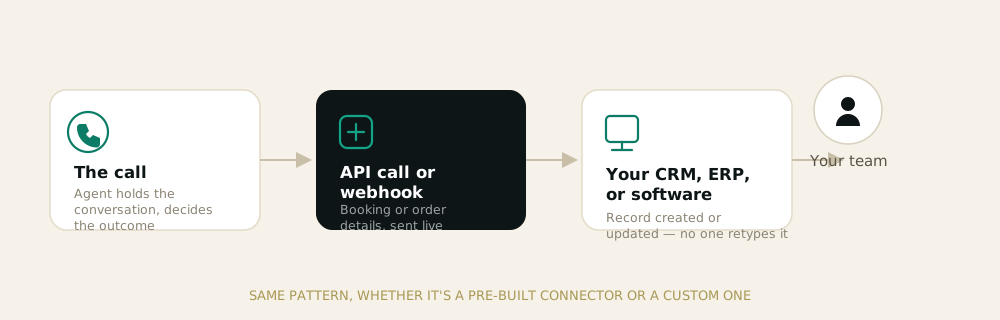
Under the hood, most custom voice AI integrations run on the same basic pattern regardless of which systems are involved:
The specifics vary by platform. A scheduling tool gets a booking API call — that's how our Cal.com integration works today. A CRM or ERP gets a new or updated contact plus a call log, built as a custom integration for your specific system rather than a pre-built connector, since every business runs something different.
| Off-the-shelf voice bot | Custom voice AI integration | |
|---|---|---|
| Holds a conversation | Yes | Yes |
| Produces a transcript | Yes | Yes |
| Books/updates your systems automatically | Rarely | Yes |
| Someone still has to act on the outcome | Usually | No |
| Fits an unusual or multi-step workflow | Rarely | Yes, built around it |
If your calls mostly need to be answered and recorded, a generic bot may be enough. If a missed step after the call — a booking that didn't make it into the calendar, a lead that never hit the CRM — actually costs you business, that's the sign you need the integration to close the loop, not just the conversation.
Setting up a custom voice AI integration follows the same three steps regardless of which systems you're connecting: map the call flows and the systems involved, build and test the integration, then go live. We walk through this in detail on the custom integrations page, including the specific systems we connect to today.
Want to see it against your own stack? Book a free demo and we'll show you what a custom integration looks like for the tools you actually use.
Join hundreds of teams running their phones on AI — without sounding like one. See a live agent on your own call flow in 30 minutes.